
Reporting a fault or asking a question
Quick checks first
These fix many faults straight away:
- Internet down or slow: turn your router off at the plug, wait 30 seconds and turn it back on. Give it a few minutes to reconnect. Check whether it's every device or just one.
- Desk phone not working: unplug it (or its power) for 30 seconds and plug it back in. Check whether other phones in the building work.
- Mobile: turn the phone off and on again, and check whether you have signal somewhere else. Try the SIM in another phone if you can.
- Power cut or building work: check the equipment has power and nothing has been unplugged.
Reporting it
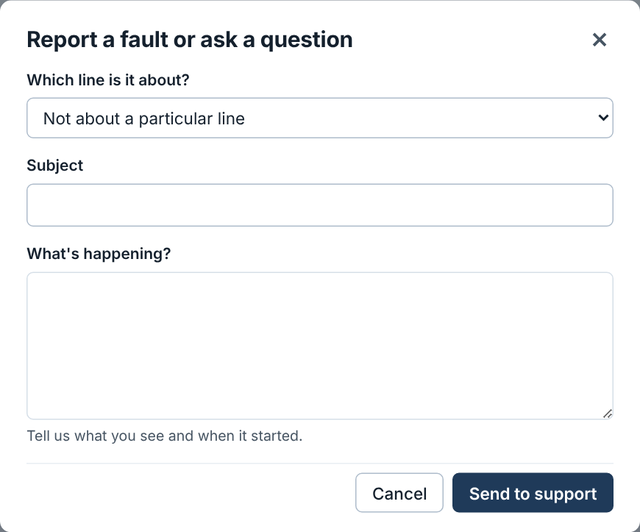
- Choose Support, then Report a fault or ask a question.
- Pick which line it's about, or Not about a particular line.
- Tell us what's happening, when it started, whether it's every device or just one, and what you've already tried.
- Send to support.
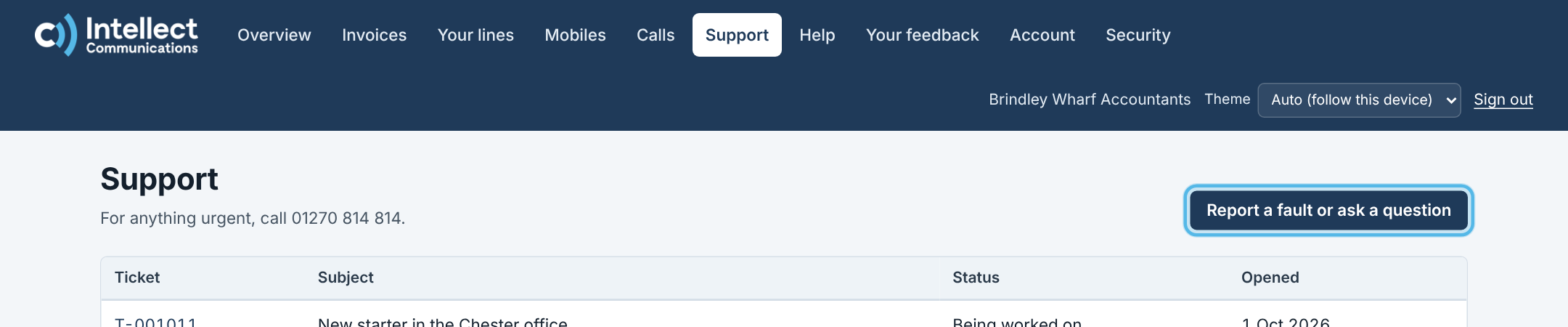
We'll reply by email (or WhatsApp, if that's how you've asked to hear from us), and you can follow every update in Support.
Following it up
- Open the ticket to see where it is: Being worked on, With the network, or Waiting for you.
- If we're waiting for you, reply on the ticket so we can carry on. The Overview also shows any tickets waiting for your reply.
- When we've resolved it, we email you. Replying to that email reopens the ticket. The email may also ask you to score how we did, from 1 to 5.
- Once it's closed and you still need help, you can raise a new one.
For an urgent fault that stops you working, call us as well.
Still need help?
- Call us on 01270 814 814
- Email support@intellect-comms.com
- Customers can sign in to the customer portal to report a fault, see invoices and manage their services.