
Managing your mobiles
The video can't be played just now. The steps are written out below, or call us and we'll talk you through it.
Choose Mobiles to see each mobile on your account, live from the network: its bars, spending limit, plan and bolt-ons, and phone features.
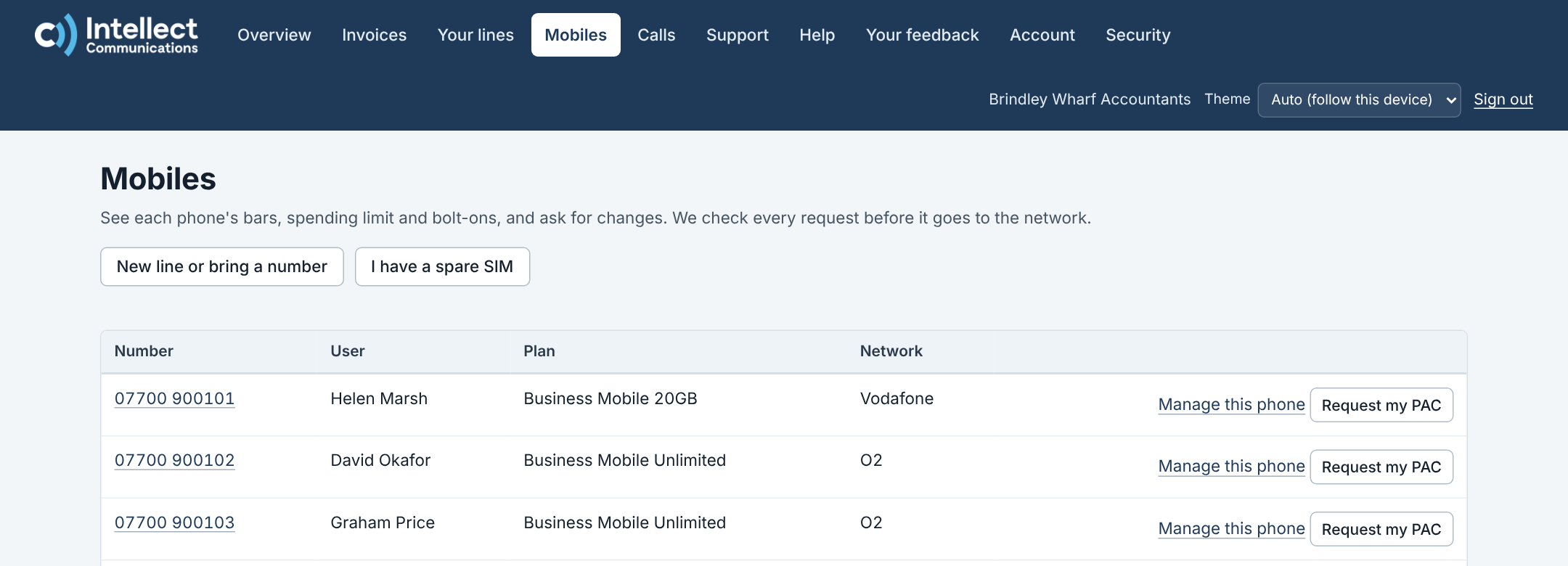
Asking for a change
Choose Manage this phone and the change you'd like, for example:
- bar international, premium-rate or roaming calls, or data,
- set or change a spending limit,
- add or remove a bolt-on, or change the plan,
- turn features such as wifi calling or voicemail on or off,
- a replacement SIM or an eSIM (for an eSIM, give the email address the QR code should go to: it's what sets up the phone),
- change the user's name.
We check every request before it goes to the network, and email you when it's done (or if it can't be done). Plan and bolt-on changes take effect the next day, and we'll confirm the price with you first.
Follow your requests under Your requests on the Mobiles page: Waiting for approval, With the network, Done, or Not going ahead (with the reason).
Shared data
If your mobiles share a data bundle, account admins see it under Shared data on the Mobiles page: how much has been used this month and last month, and by each number.
A new line, or bringing a number from another network
Account admins can choose New line or bring a number on the Mobiles page:
- Choose A new number, or Bring a number from another network.
- Tell us the plan you'd like (if you're not sure, say so and we'll suggest one) and who will use it.
- To bring a number, also give the number, its PAC code (text PAC to 65075 from that phone to get it) and the date to move it: a weekday at least two working days away.
- Choose a physical SIM or an eSIM (for an eSIM, give the email for the QR code), then Send request.
We'll confirm the plan and price with you, then set it up.
Adding a spare SIM we sent you
If you have a SIM from us that hasn't been used yet, an account admin can add it as a new line. On the Mobiles page choose I have a spare SIM, then enter:
- the SIM number: the 18 to 20 digits printed on the SIM card,
- the plan you'd like, from the list (with its monthly price),
- who it's for, such as the person's name or "Van 3".
Your request shows under Your requests as Waiting for approval. We check it, then ask the network to activate it, and email you when we've approved it and again when it's working. If we can't add the SIM, we'll tell you why.
If the portal says it can't add the SIM, check the number on the card. If it still won't go, raise a ticket and we'll look into it. This is only for SIMs we supplied: to bring a number from another network, use New line or bring a number.
Moving a number to another provider (your PAC)
To take a mobile number to another provider, open the phone in Mobiles and choose Request my PAC (it's also beside each phone on the Mobiles list). You'll be asked to confirm, as it means you're planning to leave us with that number.
We email the PAC to your account contact by the end of the next working day. For your security it's never shown in the portal. One of our team may call you first to see if there's anything we can do to keep you. You can follow the request under Your requests, where it shows as We're getting your PAC.
Give the PAC to your new provider before it expires (usually 30 days) and they'll arrange the move. Your service for that number ends when the move completes, and anything left on your contract for it is on your final bill.
Some bars only we can change
Admin, stolen and payment bars can only be changed by us. Contact Support.
Still need help?
- Call us on 01270 814 814
- Email support@intellect-comms.com
- Customers can sign in to the customer portal to report a fault, see invoices and manage their services.