
Accepting a quote and signing your order form
The video can't be played just now. The steps are written out below, or call us and we'll talk you through it.
- Open the quote from the link in our email. You can download it as a PDF too. It starts with What you told us, a short summary of what you said matters to you, then what we'd change, the prices and what each service includes.
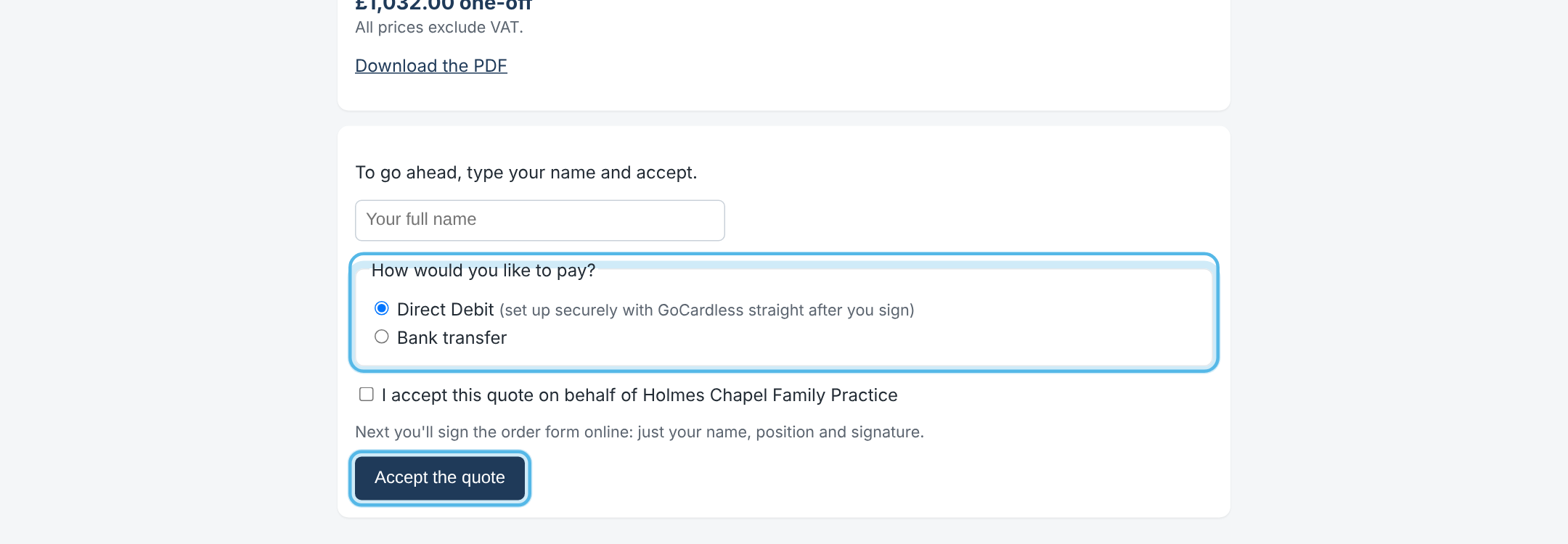
- To go ahead, type your name, choose how you'd like to pay (Direct Debit or bank transfer; we don't ask if you already pay us by Direct Debit), tick to accept on behalf of your business, and choose Accept the quote.
- Sign the order form online. We fill it in from your quote, so you only add your name, your position and your signature. There's an optional tick if you'd rather not hear about our offers, and if your contract is longer than 24 months and you're a small business, a tick to confirm you agree to that term. If you're a limited company and we don't have your company registration number yet, the form asks for it (8 characters, for example 01234567 or SC123456: it's on Companies House).
- If you chose Direct Debit, you then set it up with GoCardless.
If you're moving phone numbers to us (not mobiles), the order form includes a Letter of Authority page. It lists the numbers and the address; fill in your current provider and your account number with them if you know it, and add any other numbers. You sign it at the same time as the order form, so there's nothing extra to send later. (Mobile numbers move with a PAC code instead.)
We'll then email you to say we've received your order, with what happens next.
Quote expired or withdrawn?
Quotes are valid until the date shown. Contact us and we'll update it.
If we need to change a quote after sending it, we withdraw it first. Its link then says it's no longer valid and can't be accepted, and we'll send you the new one.
Still need help?
- Call us on 01270 814 814
- Email support@intellect-comms.com
- Customers can sign in to the customer portal to report a fault, see invoices and manage their services.